Inspections are full of friction: forms that don’t match the job, missing photos or notes discovered hours later, and an office team forced into line-by-line reviews that eat time and margin. Those small, repeated problems create callbacks, slow approvals, and frustrated technicians and managers.
Inspection Assistant (IA) was built to change that rhythm. It’s an AI co-pilot that lives inside Inspect Point, quietly checking entries in the field, suggesting pre-filled device data and note starters, flagging missing evidence, and surfacing only the exceptions the office needs to review. The result is simple and measurable: techs leave confident, offices approve faster, and owners get cleaner, AHJ-ready reports with fewer revisits. This post answers the questions we hear most from prospects — and uses real, tactical guidance so you can pilot IA in your operations and see early wins fast.
What is Inspection Assistant (IA)?
TL;DR — Inspection Assistant (IA) is an embedded AI co-pilot inside Inspect Point that helps improve technician efficiency in the field and reduce back-office report review times.
Picture a technician — call him Mike — wrapping up a monthly sprinkler inspection. He’s tired, he’s running short on time, and he worries he missed a riser photo or a signature. As he wraps up the last items in the mobile app, Inspection Assistant quietly runs checks: filling in device details from past visits, helping word a note for a repeat deficiency, cleaning up grammar, calling out a pressure reading that looks off compared to history. Mike is able to edit suggestions before accepting, add a detail only he knows after years on the job, and accept the rest of the suggestions. The report syncs back to the office in submission-ready form.
That everyday scene is the core of IA: an assistant that improves field capture and reduces the friction that creates callbacks and heavy office review. IA is native to Inspect Point — not an add-on — so it appears where your techs already do their work and ties into the same audit and submission flows.
What this means for you
- Faster, cleaner inspections with less manual entry.
- Reduced callbacks and revisits because issues are fixed on site.
- Standardized, customer- and AHJ-ready reports across your teams.
Is Inspection Assistant a separate app? No — IA runs natively inside Inspect Point for a seamless field/office workflow.
How does it actually work on the job?
TL;DR — Inspection Assistant reviews inspection report inputs before a tech gets to a site or when they submit, flags missing or inconsistent items, pre-fills device data, and shows editable suggestions with confidence indicators; every accept or reject action is tracked so humans remain in control.
Think of IA as a workflow overlay that follows the inspection from prep through delivery. Before a tech arrives on site, the app supports prep and dispatch by drawing on the industry’s largest code library—reviewing applicable code requirements, code year, system and asset types, jurisdiction, and inspection frequency to prepare the right inspection flow. On site, the assistant nudges for required photos, proposes note starters, and checks grammar and evident facts so techs can focus on the physical job, not the report. If the device is offline, Inspect Point continues to capture context and syncs suggestions once the device reconnects to the internet. After submission IA runs a final QA pass, highlighting exceptions for the office with full change logs so reviewers can act by exception rather than comb through every line.
Suggestions are presented with clear context for review, while every action remains auditable — including what was accepted, what was changed, and by whom. IA also learns from your historical inspections so suggestions improve over time.
What this means for you
- On-site corrections before the tech leaves — fewer revisits and faster proposal building for identified deficiencies.
- Office teams can shift to exception review and higher-value work.
- Full audit trails enable coaching and compliance oversight.
What outcomes should I expect?
TL;DR — Expect shorter inspection times, fewer callbacks and missed notes, faster submission to customers/AHJs, and more consistent reports across teams; Inspection Assistant shifts office work from line-by-line review to exception-based approval.
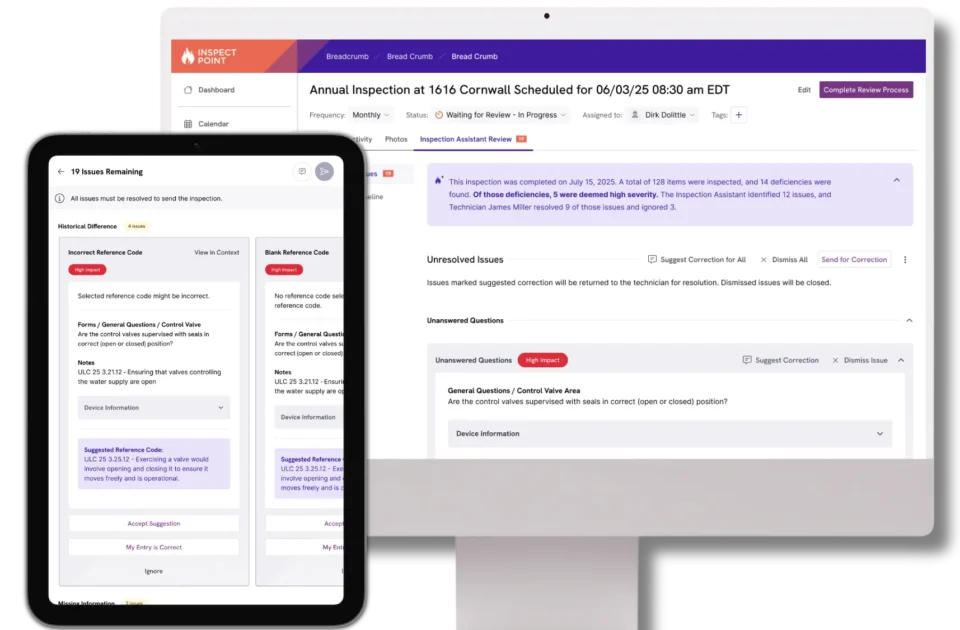
Before Inspect Point + Inspection Assistant, the review cycle often looks the same: techs drop off a report at the office, the office can spend hours checking notes and photos, the reviewer calls the tech for clarifications, and the AHJ or customer receives a delayed report. After IA, the morning routine changes. A reviewer opens the previous day’s reports and is able to work through six exceptions instead of fifty full reports. They dismiss non-critical items, request minor clarifications, and approve the rest for submission. IA compiles operational insights — highlights patterns in issue volume, resubmissions, and processing time, helping managers focus improvement efforts where they matter most.
That reallocation of effort has concrete benefits: faster direct-to-AHJ submissions, reduced administrative overhead, and improved technician ramp time because new hires get guided, consistent inspections from day one.
What this means for you
- Office effort moves to strategic review and coaching.
- Faster approvals and fewer customer escalations.
- Improved throughput and more predictable margins.
Which KPI improves first? Review cycle time and proposal turnaround times usually show early improvements; on site productivity and ramp time improve with ongoing use.
How accurate are the suggestions, and who’s responsible for the final report?
TL;DR — Inspection Assistant delivers high-quality suggestions with configurable controls over when and how suggestions appear. Technicians remain fully responsible for the final report and must accept or edit every suggestion before it’s saved — with all decisions logged for auditability.
Trust is the gating factor for any field AI. Inspection Assistant is intentionally designed as an assistant, not an autopilot. When a suggestion appears — say, to mark a device as failed — the technician sees the suggested text and why IA flagged it. If the tech knows an important contextual detail that the AI does not, they edit or reject the suggestion. The system records that choice in a change log, which serves two purposes: it creates an auditable trail for compliance and it provides coaching signals for both the AI and managers.
Customer feedback echoes this design: successful adoption depends on transparency and the ability to edit. IA’s change log and editability are central to building that trust.
What this means for you
- Suggestions are customizable to your workflow but do not replace technician judgment.
- Full traceability: who changed what and why.
- A foundation for coaching and continuous improvement.
Can the office review a technician’s accepted suggestion? Yes — edits and approvals are visible in the change log so the office can follow up as needed but the technician’s license is ultimately tied to the report.
Will my data be used to train public models? How is customer data protected?
TL;DR — No. Your inspection content is not used to train public models; Inspection Assistant uses modern LLM technology orchestrated by Inspect Point, and tenant data remains private with enterprise options for encryption and full auditability.
One of the first procurement questions we hear is about data use: “Will this tool train public models with our customer data?” The answer is straightforward — Inspect Point never uses customer inspection content to train public models. Inspection Assistant is built to protect tenant data: originals are stored within your Inspect Point instance, change logs retain versions, and for organizations with additional security requirements, enhanced controls like encryption at rest and in transit and expanded audit options are also available.
Models and components may change over time to improve quality, but data privacy and tenant isolation remain core design constraints.
What this means for you
- No public model training on your inspection content.
- Enterprise encryption and auditable trails for compliance.
- Clear governance for procurement and security reviews.
Do you store raw photos and notes? Yes — originals are housed in your system with versioning and traceability to support IA functionality and audits.
Download our guide on how we safeguard your data.
Can I choose when and where Inspection Assistant runs?
TL;DR — Yes. Admins control who sees and accepts IA suggestions with role-based permissions; you can run inspections without AI suggestions and work with a Customer Success Manager to scope IA by building, inspection type, or technician.
That control starts with how IA reviews inspections and extends to who can use it. From a centralized settings page, admins determine which issue types the AI flags — like grammar and style, missing information, unanswered questions, and values needing correction — and can treat specific issue types as high-impact so teams see the most important items first. Each issue type also has its own advanced options, letting admins fine-tune behavior like excluding certain asset types from photo or question checks or managing term lists to respect internal language standards. For office workflows, there are settings like auto-resolving prior deficiencies when a device now passes inspection. Access is just as intentional: admins control which technicians see IA, making it easy to pilot with a small group and expand over time. Together, these settings let teams tailor IA’s behavior and rollout pace to their workflows and compliance needs without forcing a one-size-fits-all approach.
Governance is vital for confident adoption. Inspection Assistant offers operational controls so you can pilot safely and scale intentionally. Start with a small pilot — a mix of experienced and new techs or a particular inspection type — then expand permissions as trust grows. For complex rollouts, your CSM helps design the rollout plan and configure specific scoping so IA supports your compliance and operations policies from day one.
What this means for you
- Stage adoption with safe pilots.
- Role-based control over who sees and accepts suggestions.
- CSM guidance for nuanced scoping and enterprise needs.
Can I run IA only for specific inspection types (e.g., monthly sprinklers)? Yes — IA can be scoped by inspection type, technician, or building.
How long does it take to get value from Inspection Assistant?
TL;DR — Most teams see measurable gains within 2–4 weeks as IA learns from your historical data and review loops tighten.
A practical rollout follows a short cadence: week one is mapping and pilot setup, weeks two and three are iterative tuning and feedback, and by week four teams typically see early metrics shift — faster submissions, fewer revisits, and reduced reviewer hours. Inspection Assistant improves with your data, so the pilot should include measurements and weekly check-ins: baseline inspection time, time-to-submission, callbacks, and reviewer hours. Use the first month to tune confidence thresholds, scope, and admin controls; the second month to expand the pilot and standardize templates. This rapid, measurable approach delivers early wins while managing risk.
What this means for you
- Quick pilots deliver fast, visible improvements.
- Ongoing improvement as IA learns from your operations.
- A clear baseline and weekly measurement plan accelerate adoption.
What’s a typical pilot? 5–10 technicians across a few inspection types with weekly reviews with your CSM.
How do I get started?
TL;DR — Inspection Assistant is part of Inspect Point AI — existing customers contact their Customer Success Manager to activate; new customers request a demo and can book a pilot to map IA to their inspections.
Getting started is tactical and collaborative. Here’s a starter plan: map your current inspection and review process, select pilot goals and KPIs, choose 5–10 technicians (mix of tenured and new), define the inspection types included, baseline the KPIs, and schedule weekly check-ins with your CSM.
Your CSM helps configure settings and tune IA for your code and operational needs. The goal in the first month isn’t perfection — it’s measurable improvement and trust. IA is an assistant that augments your people and processes; with a focused pilot you’ll see its disruptive benefits without disruptive risk.
Starter checklist
- Identify pilot goals & KPIs.
- Select pilot technicians (5–10).
- Baseline current KPIs (inspection time, reviews, revisits).
- Report results back to techs and management.
Inspection Assistant isn’t a novelty — it’s a practical change to the inspection workflow that reduces rework, standardizes quality, and shifts office work to higher-value decisions. For operations teams, Inspection Assistant turns technicians into consistently reliable reporters and gives managers the data they need to coach and scale. If you’re thinking about piloting AI, start small, measure early, and iterate with a trusted advisor. The payoff is simple: fewer callbacks, faster AHJ submissions, and a more efficient team — which is exactly the kind of impact operations leaders want to show.
Related Resources:
See Inspect Point run on your own inspections. A 30-minute demo, no commitment.