Your crews don’t show up to a job with just one tool. They bring what the job calls for: the right pipe, the right fitting, the right system for the hazard. AI works the same way. There’s no single tool that does everything well, and grabbing the wrong one wastes time, money, and trust.
That’s why we’re breaking it down for you. Once you understand what each type of AI does — and can’t do — you’ll stop guessing and start putting the right tool to work.
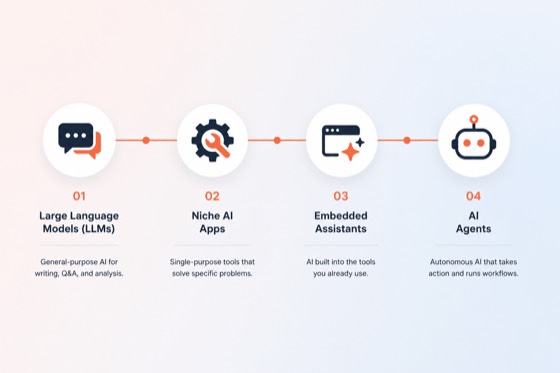
Here’s an overview of the top four types of AI tools for fire protection contractors.
Large Language Models (LLMs)
Your all-purpose knowledge engine — thinks, writes, and reasons on demand.
An LLM is a general-purpose AI trained on massive amounts of text. Think of it as an extremely well-read assistant who can draft documents, answer technical questions, summarize reports, and write in your voice — but it needs to be fed context, and it doesn’t operate within your system. Instead, it’s an external tool, like ChatGPT, Claude, and Gemini. They don’t “know” your company; you bring the information to them.
| Pros | Cons |
|---|---|
|
|
Sample Use Cases
- Draft scope-of-work narratives from your takeoff notes
Data needed: Takeoff quantities, system type, job address, AHJ requirements, past proposals as examples - Write customer-facing emails, proposals, and deficiency letters
Data needed: Customer name and contact info, job details, deficiency descriptions, your preferred tone/template - Summarize long inspection reports or service histories into a quick brief
Data needed: Uploaded or pasted inspection report, customer account context, any specific questions you want answered
Niche AI Apps
Single-purpose extras — built to do one thing exceptionally well.
Niche AI apps are standalone, purpose-built tools designed to solve one specific business problem. These aren’t built into your existing software, and they’re not general-purpose chat tools. They’re external apps you add to your workflow for a single job: optimizing your routes, handling inbound calls, or following up with customers automatically. Think of them like specialty subcontractors — you bring them in for the one thing they’re great at.
| Pros | Cons |
|---|---|
|
|
Sample Use Cases
- Lien waiver and contract document processing
Data needed: Signed lien waivers and subcontractor agreements, job numbers and contract values, sub and supplier contact list, conditional vs. unconditional waiver templates, payment schedule per job - Review and reputation management
Data needed: Customer name and contact info, job completion trigger from your FSM, business Google profile access, preferred response tone - Call handling and customer service
Data needed: Business hours, service area, common FAQs, escalation contacts, preferred tone and script
Embedded Assistants
Small lifts inside your existing apps — AI baked right into the tools you already use.
Embedded assistants are AI features built directly into software you already use — your CRM, field service platform, estimating software, or accounting system. You don’t go to a separate AI tool; the AI comes to you inside the workflow. Think low-friction, high-impact upgrades with minimal learning curve.
| Pros | Cons |
|---|---|
|
|
Sample Use Cases
- Job costing and budget alerts
Data needed: Estimated job costs from your bid, actual labor hours logged by techs, material purchases and POs, job number tied to your FSM or accounting system - Quote development from inspection findings
Data needed: Completed inspection report with deficiencies, parts and labor pricing, customer account details, quote template in your platform - Smart scheduling and dispatch
Data needed: Tech certifications and territories, job type and estimated duration, customer appointment windows, current work order queue, GPS or home base location per tech
AI Agents
End-to-end solution — autonomous multi-step execution, not just answers.
An AI agent doesn’t just answer questions — it takes actions. Agents can follow a multi-step process autonomously: read a file, make a decision, update a record, send a notification, and log the result, all without you clicking through each step. Think of it as an AI employee who works a checklist from start to finish. Agents require more setup, but they’re the closest thing to automating entire workflows with minimal human touchpoints.
| Pros | Cons |
|---|---|
|
|
Sample Use Cases
- Deficiency quote follow-up
The agent sends the repair quote after an inspection, follows up automatically if there’s no response, logs every touchpoint in your CRM, and escalates to your service coordinator if the quote goes cold.
Data needed: Completed quote, customer contact info, follow-up cadence and messaging, escalation threshold, CRM or FSM API access - Inspection scheduling and customer outreach
The agent identifies customers due for inspection, sends the outreach, follows up if there’s no response, confirms the appointment, and books it into your schedule — start to finish.
Data needed: Customer account list, inspection frequency by system type and jurisdiction, tech availability, customer contact info, email and text templates, FSM calendar access - Accounts receivable and invoice follow-up
The agent sends invoices upon job completion, follows up on unpaid balances at set intervals, escalates overdue accounts to your office, and logs all communication — so nothing slips through without a human having to chase it.
Data needed: Completed job and invoice data, customer billing contact, payment terms, follow-up cadence and messaging, accounting system API access
The right AI tool isn’t the most powerful one — it’s the one that fits the problem in front of you. Start with what’s costing you the most time or causing the most friction, match it to the tool type that makes sense, and build from there. The contractors who get the most out of AI aren’t the ones who adopted everything at once. They’re the ones who picked the right starting point and kept going.
When you’re ready, learn more about our AI Suite to see what we’ve built and how it fits into your workflow.