Request a demo
See How It Works

Inspection Assistant

AI that accelerates fire & life safety inspections without sacrificing quality.
Ship more compliant inspections, capture more revenue, and give techs a co‑pilot that just works.

AI Pioneers in Fire & Life Safety

See Inspect Point In Action

Get a quick overview of how Inspect Point simplifies fire and life safety management. Our platform streamlines key tasks like scheduling, inspections, and compliance reporting while still boosting efficiency and accuracy. Perfect for a high-level look at what Inspect Point can do for your business.

See Inspection Assistant in action

Watch the 90-second overview

Turn Every Tech Into Your Best Tech

Paper forms, manual review, and double-entry slow you down. Missed inspection details become callbacks. Inconsistent reports stall approvals. Inspection Assistant turns every tech into your best tech with an AI sidekick on each and every inspection job. In the office, managers can finally get ahead of the review cycle with a streamlined workflow that continues all the way to AHJ submission.

Outcomes

With an AI assistant your teams can:

AI-Powered Workflows

Inspect Point is the most comprehensive and flexible inspection, testing, and maintenance platform on the market. AI supercharges that functionality.

    Prep & Dispatch

    Our scheduling engine queues up the correct and customizable code-based question set (NFPA, ULC, jurisdictional) for your job. Inspection Assistant learns and grows based on your company’s historical operations, inspections, and customer’s data to prepare for the inspection before you even get on site.

    1

    Inspect on Site (Even Offline)

    Convert an inspection to service work and book the right tech in just a few clicks.

    Created by potrace 1.16, written by Peter Selinger 2001-2019
    2

    Sync the Field & Office

    Techs are ultimately responsible for the inspection report so they have the power to accept or reject AI-powered suggestions. Digital reports and the data collected sync back to the office in real-time for review.

    3

    Back Office Review

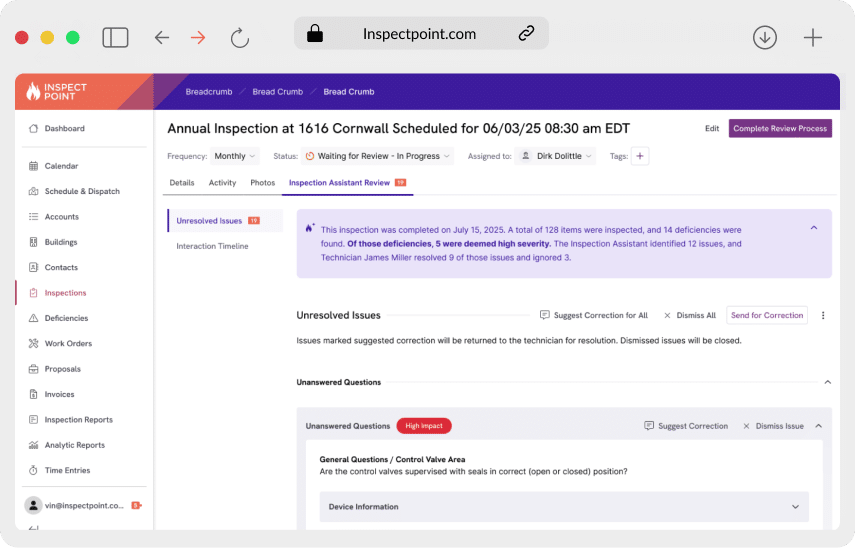
    After the report is completed, the office can review the AI-vetted report for any exceptions or anomalies - including a change log of all suggestions accepted or rejected - so that next steps can be communicated before the tech even leaves the job site.

    4

    Delivery & Submission

    5

Powerful AI Inspection Tools Designed for Efficiency

See how AI features supercharge your inspection workflows to help you complete more inspections at a higher quality.

Dynamic, History-Aware Templates

Auto‑Suggest Fields & Notes

Inspection Assistant learns from your operations and each building’s history to pre-populate fields, propose note starters, and carry forward verified device data. Techs spend less time typing and more time inspecting — while your reports stay accurate, consistent, and aligned to your internal standards.

Grammar & Writing Style Checks

Review before techs leave the site

After inspection, AI runs a final pass to flag missing photos, incomplete or conflicting fields, and obvious errors (like mismatched device counts). Techs can resolve issues on-site, cutting revisits and reducing office back-and-forth.

Humans in control

Submission-ready reports

Inspection Assistant helps produce customer and AHJ‑ready reports featuring detailed information that leads to clear next steps for compliance with the click of a button. Inspect Point’s integrated workflow helps you keep customers compliant by managing deficiency lifecycles all the way through to resolution.

Seamless Data Flow

What Customers Are Saying

Cory Blair, Operations Manager

Genesis Building Systems

"We're excited to leverage Inspect Point's AI capabilities to deliver consistency in our Inspections Department with its ability to adapt to our company's unique procedures. AI-driven audits in the field will minimize return trips and report revisions, accelerating turnaround times and reducing administrative workload, ultimately enhancing the customer experience."

Built for Every Role on Your Team

Less back-and-forth and more Inspecting.

Inspection Assistant is your apprentice, not a replacement. AI-powered inspections auto-suggest pass/fail, pre-fill device data, and flag missing photos or notes—so you stay focused on the job, not the report. You’re always in control: accept, edit, or reject suggestions before anything is submitted. Finish faster, avoid callbacks, and walk off-site confident the report is solid—even when you’ve been working offline.

Standardize Quality. Focus on Exceptions.

Skip the line-by-line slog. AI-vetted reports arrive standardized with clear change logs and open issues, so you can review by exception and keep work moving. Enforce templates, tighten writing and grammar, and ensure required evidence is attached before submission. Spend your time managing risk and next steps — not fixing format issues.

More Billable Hours. Less Risk. Happier Customers.

When inspections run faster and reports are cleaner, you unlock revenue and trust. Inspection Assistant lifts throughput, shortens ramp time for new hires, and keeps quality consistent across teams. With transparent audit trails and role-based controls, you reduce exposure while delivering a better customer experience — and you see it in fewer revisits, quicker approvals, and stronger margins.

Accuracy, Security & Control - Enterprise‑Ready from Day 1

  • Humans‑in‑Control: Suggestions are clearly marked; techs accept or edit before anything is saved.
  • Data Privacy: Your content isn’t used to train public models. Period.
  • Learn & Grow: Your individual instance is continuously trained and outputs are tailored based on your customer and business data.
  • Access & Audit: Roles, permissions, and audit trails across suggestions, edits, and approvals.
  • Encryption: Data is encrypted in transit and at rest.
  • Compliance: SOC 2 Type II and GDPR‑aligned practices.
Humans‑in‑Control: Suggestions are clearly marked; techs accept or edit before anything is saved.
Data Privacy: Your content isn’t used to train public models. Period.
Learn & Grow: Your individual instance is continuously trained and outputs are tailored based on your customer and business data.
Access & Audit: Roles, permissions, and audit trails across suggestions, edits, and approvals.
Encryption: Data is encrypted in transit and at rest.
Compliance: SOC 2 Type II and GDPR‑aligned practices.

Scheduling FAQ

Your Questions Answered: Navigating the Inspection Process

Your AI Questions Answered

  • What does Inspect Point’s AI-Powered Inspection Assistant do?

    Inspect Point’s AI-Powered Inspection Assistant reviews inspections in real time while technicians are still on-site. It automatically checks for missing signatures, unanswered questions, incomplete deficiency notes, and required photos or documentation. The Assistant flags issues immediately so techs can fix them before submitting the inspection—reducing rework, office back-and-forth, and costly return visits.

  • How does Inspection Assistant help the back-office?

    Instead of manually reviewing every line of every inspection, office teams move to exception-based review. The AI flags only the inspections and issues that need attention, allowing managers to approve reports faster and submit them to customers or AHJs with confidence. This significantly reduces administrative workload, approval delays, and inspection bottlenecks.

  • Can I use Inspection Assistant outside of Inspect Point?

    No – Inspection Assistant is built in-house and runs natively inside Inspect Point for a seamless field/office workflow.

  • My techs own the certification. Does AI change what they write?

    Humans stay in control. Suggestions are clearly marked; technicians must accept or edit before anything is saved. Every accept/reject is tracked in the change log for review.

  • Can I control which inspections are AI-powered?

    You can control which technicians have access to AI suggestions through admin settings. Technicians always remain in control and can accept, edit, or reject any AI recommendation. Our team will work with you to help determine the best approach for additional configuration needs.

  • How long does it take to see improvements with Inspection Assistant?

    Most teams see faster inspection times within 2–4 weeks as suggestions learn from your data and review loops tighten.

  • What model does Inspection Assistant use?

    We use a mix of modern large-language-model (LLM) technology orchestrated by Inspect Point—models may change over time to improve quality, but your data remains private and is never used to train public models. For enterprise, we enforce encryption in transit/at rest and full auditability. 

  • Will my data train public models?

    No. Your content is not used to train public models; it stays private to your tenant under our security and privacy controls.

Start Your AI Journey Today

Inspect Point makes it easy to leverage AI with embedded workflows.

Schedule Your Demo

After completing the form, one of our team members will contact you to schedule your demo.

Discovery Call

One of our product experts will connect with you to answer questions and learn more about your business.

See It In Action

Once we better understand your business and workflows, we’ll share how our tailored solutions can support your unique needs.